Capstone: an Android App
Android support is new and still settling. It builds and runs real apps, but the -app options,
the [target.x.app] table and how tkControls behaves under a finger may still change, and it has
been tried on few devices. What this chapter shows was run on the Android Studio emulator.
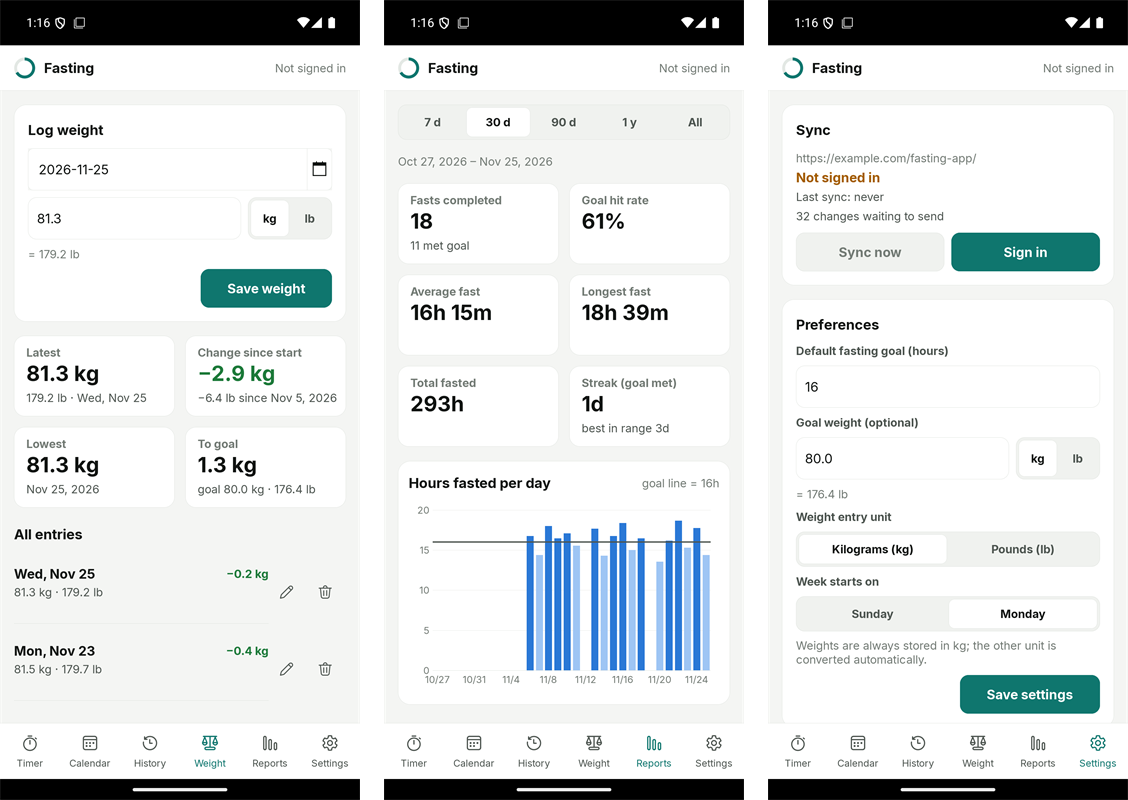
The last capstone put one source on three desktops. This one puts a program in a pocket. Fasting is a tracker for intermittent fasting: a timer for the fast that is running, a calendar, a history, a weight log, reports and settings, with its data in SQLite on the phone and a sync to a web server over HTTPS. It is written in tiko with tkControls, it has no Java or Kotlin in it, and the same source runs on the desktop as a phone-sized window.
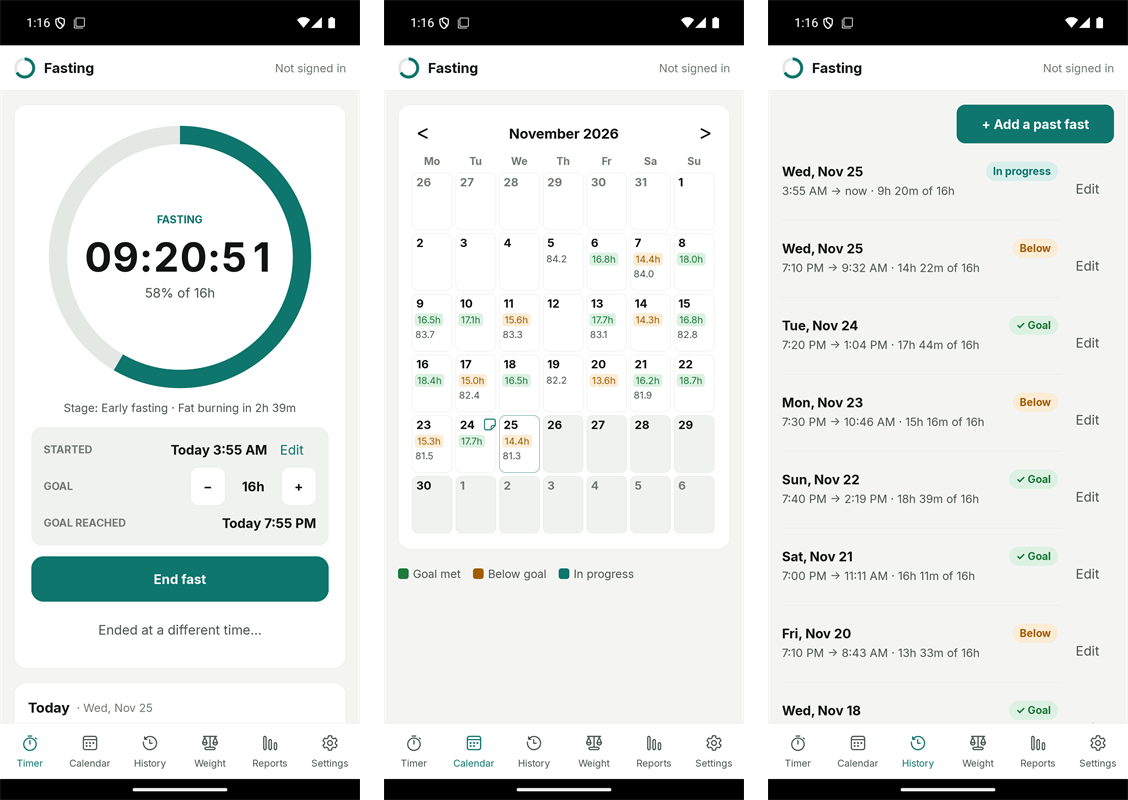
The chapter has three parts: setting up a Windows PC to build for Android, a one-button app to prove the setup, and then the parts of Fasting that are worth copying. It joins:
- tkControls and tkApp from Chapter 36, now on a touch screen;
tiko buildandtiko.tomlfrom Chapter 31, with a target whosekindisapp;- conditional compilation (Chapter 16), for the one place where Android differs;
- a worker thread that hands its results to the screen (Chapter 23);
- a C library, SQLite, linked into the app (Chapter 30).
Setting up the PC
Android apps are built on Windows: the Windows toolchain carries the two Android targets, and the Linux and macOS ones do not. Besides tiko and clang (Chapter 1), tiko needs three things from Google: the NDK, which holds Android's C library; the SDK's Build-Tools and a platform, which pack and sign the app; and a JDK, because the packing and signing tools are Java. Android Studio installs all three where tiko looks for them, so no environment variable is needed.
- Install Android Studio from https://developer.android.com/studio with its defaults, start it,
and let its Setup Wizard run (Standard). The SDK goes to
C:\Users\<you>\AppData\Local\Android\Sdk, and the JDK comes inside Android Studio, atC:\Program Files\Android\Android Studio\jbr. - Open More Actions › SDK Manager. On SDK Platforms tick Android 16, API Level 36. On SDK Tools tick Show Package Details, then the newest Android SDK Build-Tools, NDK (Side by side) version 30 or newer, Android SDK Platform-Tools and the Android Emulator. Apply.
- Open More Actions › Virtual Device Manager, create a phone (Medium Phone) with an API 36 x86_64 image, and start it. Or use a phone with Android 10 or newer, with USB debugging turned on in its Developer options.
- Put the SDK's
platform-toolson the terminal'sPATH, foradb, and check that it sees the device:
$env:Path += ";$env:LOCALAPPDATA\Android\Sdk\platform-tools"
adb devices
List of devices attached
emulator-5554   device
A first app
This is the smallest app worth installing: one button, which closes it.
'' hello.tiko -- one button; pressing it closes the app.
#import "vendor/tkControls/tkApp"
#import "vendor/tkControls/tkButton"
using tkApp
using tkButton
using tkHost

dim shared as TK_WIDGET ptr gButton

'' Called when the button is pressed: tkApp_Run below returns, and the program ends.
sub OnClose( byval button as TK_WIDGET ptr, byval id as int32 )
    print "hello: button pressed, closing"
    tkApp_Quit( )
end sub

'' Called whenever the form gets a size (at the start, and when the phone turns): centre the button.
sub OnSize( byval f as TK_FORM ptr, byval cx as int32, byval cy as int32 )
    dim as int32 bw = tkForm_Scale( f, 200 ), bh = tkForm_Scale( f, 56 )
    tkWidget_SetPos( gButton, (cx - bw) \ 2, (cy - bh) \ 2, bw, bh )
end sub

if tkApp_Init( ) = false then print "tkApp_Init: " & *SDL_GetError( ) : end 1
var form = tkApp_NewForm( "Hello", 360, 640 )
gButton = tkButton_Create( tkForm_Widget( form ), 1 )
tkButton_SetText( gButton, "Close the app" )
tkButton_SetClickCallback( gButton, @OnClose )
tkForm_OnSize( form, @OnSize )
dim as int32 rc = tkApp_Run( form )
print "hello: bye"
end rc
Nothing in it is Android's. tiko hello.tiko makes a Windows program of it; with -target and
-app the same file becomes an app:
tiko -target android-x86_64 -app hello.tiko
adb install -r hello.apk
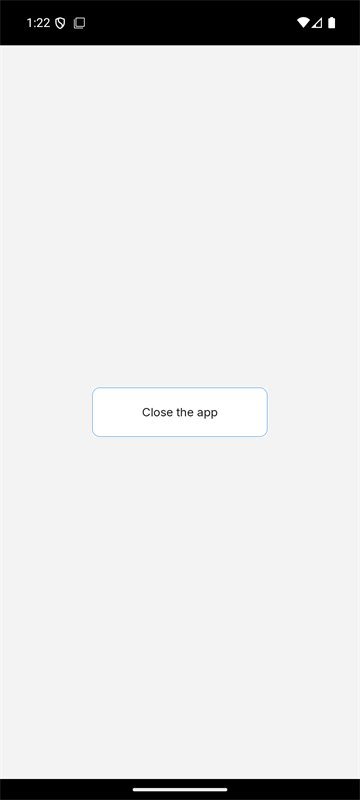
-target android-x86_64 is for the emulator, which runs on the PC's processor; a phone wants
android-arm64. -app compiles the program as a shared library, links SDL3 and tkControls into
it, adds Android's start-up code and the fonts, writes the manifest, packs it all into
hello.apk and signs that with a debug key, which tiko makes the first time in
C:\Users\<you>\.android\debug.keystore. On the device the window is the whole screen, whatever
size the program asked for. Tap the button and the app closes. print has no console there: its
lines go to Android's log.
adb logcat -s tiko
I tiko    : hello: button pressed, closing
I tiko    : hello: bye
The app's identity lives in tiko.toml, so the command line stays short (Chapter 31):
[package]
name = "hello"

[target.hello]
main = "hello.tiko"
kind = "app"

[target.hello.app]
id      = "com.example.hello"    # never changes once the app is published
label   = "Hello"                # the name under the icon
version = "1.0,1"                # what users see, and the number Android compares
tiko build hello -target android-arm64 writes out/debug/hello.apk. The table takes the rest of
-app's options too: icon, assets, permissions, key and bundle.
The Fasting app
The project
| Path | Holds |
|---|---|
tiko.toml | a desktop target, a fasting app signed with the debug key, a fasting-release app signed with its own key |
src/main.tiko | opens the database and runs the app |
src/model/ | fasts, weights, notes and settings; days, formats and the report's sums |
src/store/ | the phone's SQLite database: a copy of the data, and an outbox of changes not yet sent |
src/sync/ | talking to the server |
src/ui/ | the form, six pages, the editor pages, fields and the theme |
The app target asks for one permission. Without it Android refuses every network call the app
makes, with a SecurityException on the Java side:
[target.fasting.app]
id = "com.example.fasting"
label = "Fasting"
version = "0.1,1"
icon = "res/icon.png"
permissions = ["INTERNET"]
On Android the working directory is the app's private storage, so main.tiko opens a plain
fasting.db and the database lives there, kept until the app is removed.
One form, six pages
A phone app has one window, the whole screen. Fasting makes one form with tkApp_NewForm, 412 by
860 on the desktop, and puts on it a top bar, a navigation bar of six buttons at the bottom, and
six pages between them, one shown at a time. Each page is a tkScrollPanel whose content is a
tkStack: a column of controls, each after the one before, which is how most phone screens are
laid out. A card is a panel with a stack of its own, and a row is a horizontal stack:
dim as TK_STACK ptr rg = tkStack_Create( tRowGoal, TK_STACK_HORIZONTAL )
tkStack_AddFill( rg, gl )                    '' the label takes what is left
tkStack_Add( rg, tBtnDec, 40 ) : tkStack_Add( rg, tGoalVal, 64 ) : tkStack_Add( rg, tBtnInc, 40 )
tkStack_AddStack( ss, tRowGoal, rg, 44 )     '' the row goes into the card's column, 44 high
Sizes are design units, and on a phone a design unit is a dp, a density-independent pixel: the navigation buttons are at least 48 high, the size Android's guidelines give a fingertip, on any screen. tkControls keeps the form inside the safe area, clear of the status bar, the navigation bar and a camera cutout.
Each page is a module that registers the procedure that builds it, so the form knows nothing of what is on a page. And none of it is Android code.
Touch, and editor pages
tkControls turns touch into what the controls already understand: a tap is a click, a swipe
scrolls a panel and flings it, a long press is a right click. Three controls have a setting for a
finger, which has no hover and no double click: the calendar opens a day on one tap
(SetActivateOnClick), the charts pin the nearest point on a tap and keep its value shown
(SetTapToInspect), and a numeric text box asks Android for the number pad, with a decimal
point when it has decimal places.
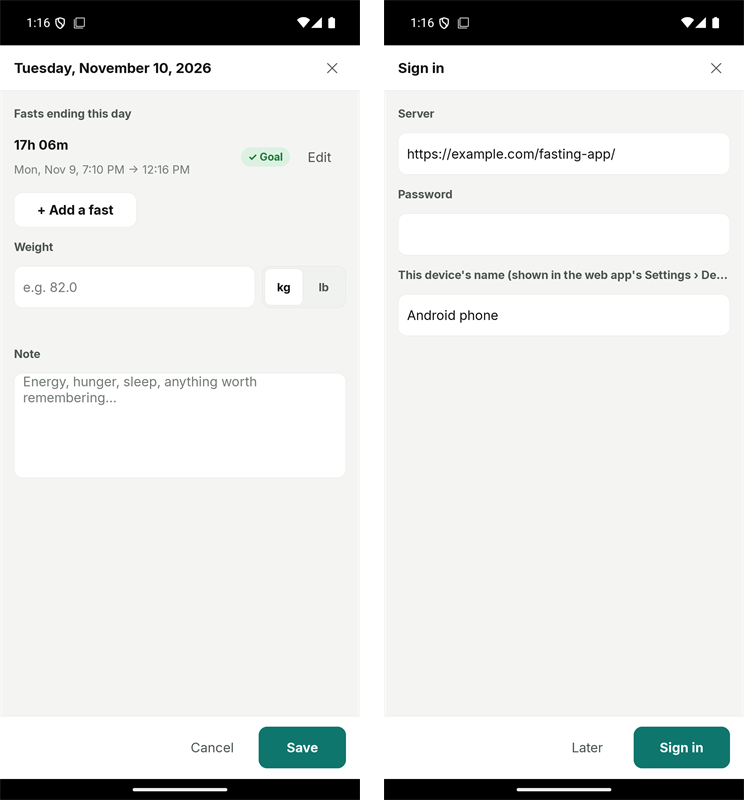
Tapping a day, Edit or Add a past fast opens an editor page, a form of its own made with
tkApp_NewForm as on the desktop. On Android every form after the first is drawn inside the one
window, over the whole screen, and Android's BACK gesture closes the top one as Cancel
does. The app has no code of its own for BACK.
Talking to the server
Sync sends the changes made on the phone and gets back everything else, as JSON over HTTPS,
through one function that makes a request. That function is the one place where the phone and the
desktop differ. On the desktop it is std/http. On Android std/http has no TLS library to use,
so the function calls Android's own java.net.HttpURLConnection through JNI, with the JNIEnv
that SDL_GetAndroidJNIEnv( ) returns; Android's TLS and certificate store do the rest.
#ifndef TIKO_OS_ANDROID
public function HttpDefault( ... ) as HttpReply     '' std/http
    ...
end function
#else
public function HttpDefault( ... ) as HttpReply     '' HttpURLConnection, over JNI
    ...
end function
#endif
Sync runs on a worker thread so that the screen never waits for the network, and the worker hands
each result to the screen with tkApp_RunOnUI, because only the thread that made the controls
may touch them (Chapter 36). One thing is Android's own. A thread that calls Java must
have a real stack: with threadcreate's default, the first JNI call on that thread stops the app.
gSyncThread = threadcreate( @SyncWorker_, 0, 1024 * 1024 ) '' 1 MB: it calls Java on Android
The app also syncs when it comes back to the front. SDL reports that as
SDL_EVENT_DID_ENTER_FOREGROUND, which an event watch (SDL_AddEventWatch) sees as it happens.
A change made with no network, or before signing in, is written to the SQLite copy and queued in
the outbox in one transaction, so the screens behave the same either way, and the queue goes
at the next sync. SQLite, the JSON library and SDL3 all link statically: the APK carries one native
library, libmain.so, with everything inside.
Light and dark
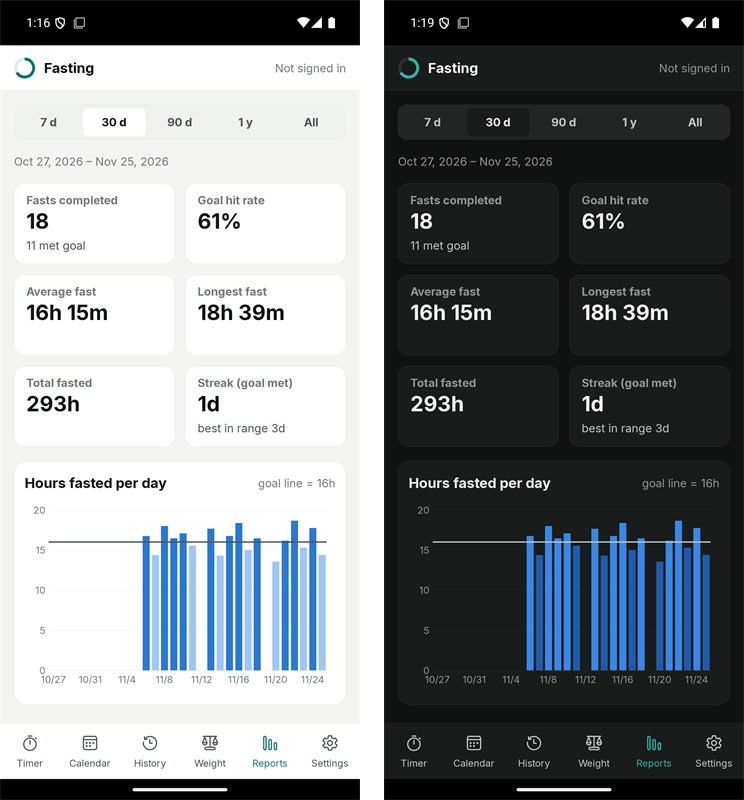
The app gives tkApp two palettes, tkApp_SetThemePair( dark, light ), and its System setting is
tkApp_SetThemeMode( TKAPP_THEME_SYSTEM ), which follows the phone's dark mode as it changes.
What the app paints itself, the ring and the calendar's days, reads its colours from the palette
in force, and tkForm_OnThemeChanged repaints it after a switch.
Building, and a release
Most of the work happens on the desktop, where a build takes seconds:
tiko build desktop
tiko build fasting -target android-x86_64
adb install -r out\debug\fasting.apk
With TK_VIRTUAL=1 set, tkControls draws the desktop window as it draws on Android, editor pages
inside the one window, so the layout can be checked before a phone is involved.
A release is signed with the app's own key, made once with keytool and kept safe: every
later version must be signed with the same key and have a higher version number, or the phone
refuses it as an update. tiko reads the key's password from an environment variable, never from
the command line:
[target.fasting-release.app]
id = "com.example.fasting"
label = "Fasting"
version = "0.1,1"
icon = "res/icon.png"
key = "keys/fasting-release.jks,fasting"
permissions = ["INTERNET"]
$env:TIKO_ANDROID_KS_PASS = Read-Host "Keystore password"
tiko build fasting-release --profile release -target android-arm64
bundle = true in the table, or -appbundle on the command line, makes an App Bundle
(.aab) instead, which is what Google Play takes.
What the phone taught
- No permission, no network. Android asks the manifest, not the code.
- A thread that calls Java needs a stack. The default is too small for the Java VM to attach.
- Gesture bars are not unsafe. SDL counted the gesture zones down each side of the screen as unsafe, and every page lost a band down both edges; tkControls keeps clear of the system bars and a cutout only.
- Rounding differs at 2.625. A height written one way and drawn another differed by a pixel at the emulator's density, and a card lost its bottom edge on the phone only. Compute a size once.
- A finger has no hover. Anything that showed itself on hover needs a tap.
Exercises
- Give
hello.tikoan icon of your own and the label Hello, phone, intiko.toml, and install it over the first one. What happens if you lower the version number? - Add a second button that adds one to a counter shown on the first. Turn the phone (Ctrl+Left on the emulator): what calls put the buttons back in place?
- Print the value of
exepathand ofcurdirfrom the app, and read them withadb logcat. Where would a file the app writes go?